
Is it possible to change the login email address for guest users?
Email addresses for guest users can be changed. They must be changed by individual guest users on the Account settings screen.
In the following sections, we explain the steps in two scenarios: when a guest user can log in to a guest space, and when a guest user cannot.
When a guest user can log in to the guest space
-
Access and log in to the guest space.
The login URL is "https://subdomain.kintone.com/k/guest/guest/login". -
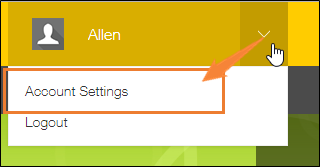
Click the Account menu icon (the down arrow) at the top right of Kintone, then click Account settings.
-
In the Email address section, specify a new email address and your password and click Save.
-
When a confirmation email is sent to the new email address, click the URL in the email.
The guest user is required to complete the change of the email address within an hour after receiving the confirmation email.
When a guest user cannot log in to the guest space
This section describes what a guest user needs to do when s/he has forgotten the email address or password to log in.
In this case, a Kintone administrator first needs to check the registered email address for the guest user and set a new password.
After that, the guest user needs to log in using the registered email address and the new password set by the Kintone administrator and then change the email address.
(1) Checking the email address and setting a new password (Operation by a Kintone administrator)
-
Click the Settings icon (the gear-shaped icon) at the top of Kintone, then click Kintone administration.
-
Click Guest management.
-
Click the Edit icon at the left of the guest user in question.
-
In the Email address field, check the registered email address.
-
Set a new password in the Password field, then click Save at the upper left of the screen.
Inform the guest user of the registered email address and the new password.
(2) Logging in to the guest space (Operation by a guest user)
-
Access the guest space and log in with the email address and a new password provided by the Kintone administrator.
The login URL is "https://subdomain.kintone.com/k/guest/guest/login". -
Change the email address by following the steps described in the following section.
When a guest user can log in to the guest space
Also change the password if necessary.