
Contacting customer support
If you have any issues with kintone features or app settings, please contact customer support.
-
Click the Help button (question mark icon) at the top of the Kintone screen, and select Contact us.
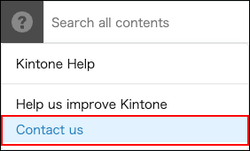
-
Fill in the required information on the form that is displayed.
"*" indicates a required field. -
Confirm the information that you entered, then click Send .
Once the form is sent, an email indicating that your inquiry was received will be sent to the email address that you entered in the form.