
Opening the AI App Creator
This article explains how to open the AI App Creator and gives a general overview of its layout.
Opening the AI App Creator
-
On the Kintone portal, click the Create app icon (the plus sign-shaped icon) in the Apps section.
-
On the Kintone marketplace screen, click Create app from scratch.
-
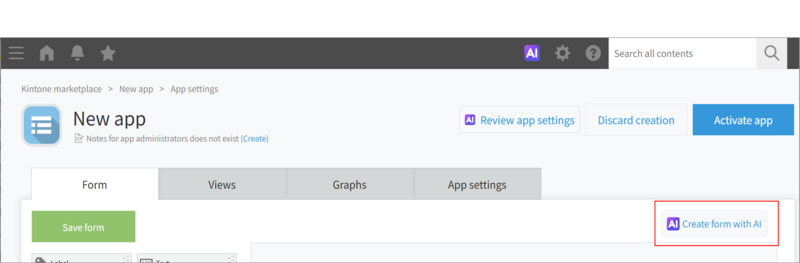
On the App settings screen, click Create form with AI.
Overview of the AI App Creator
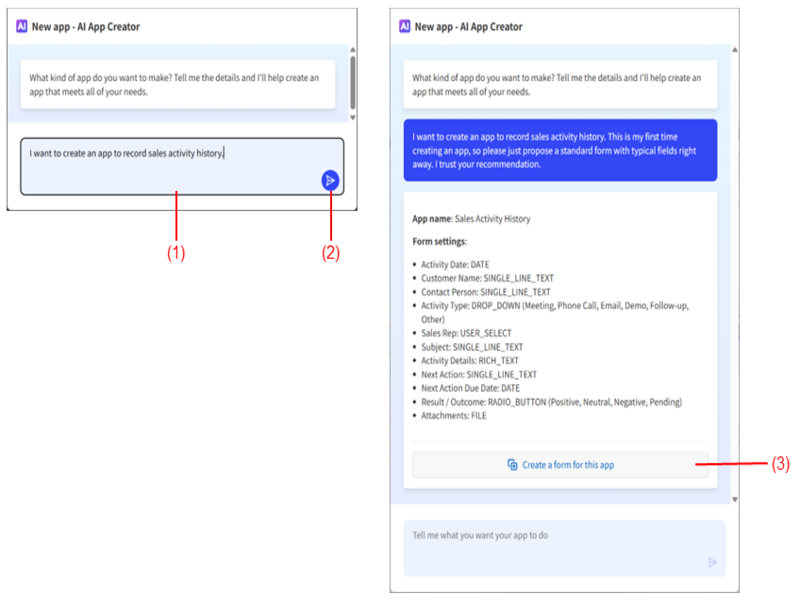
(1) The prompt input field
Enter your questions or instructions in this field.
(2) The "Send" button
This button sends the questions or instructions entered in the prompt input field to the AI App Creator. When it is clicked, the AI App Creator will start generating an answer.
(3) The "Create a form for this app" button
This button creates a form with the content suggested by the AI App Creator. It may take some time for the form to be created after the button is clicked.