
Checking webhook execution logs
You can check the log of the latest 10 webhook executions for each webhook setting.
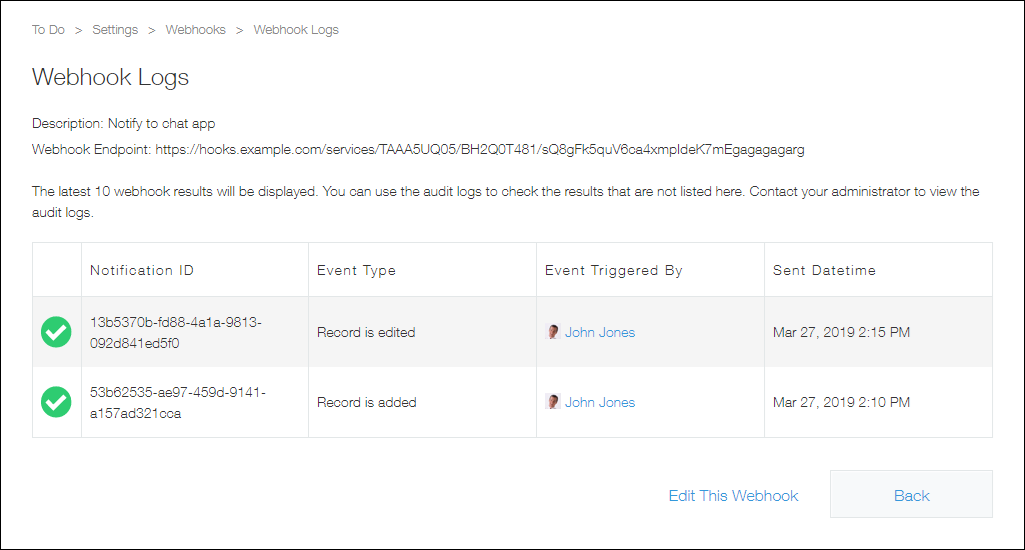
In the execution log, you can find the following information:
- Whether the notification is successfully sent
- Notification ID
- Action type
- User who performed the action
- Execution date and time
To check the log of the executions older than the latest 10 executions, check audit logs. Audit logs can be checked only by Kintone users & system administrators. For details on the audit logs, refer to the following page:
A list of audit logs that Kintone generates.
Steps
To check the log of the latest 10 webhook executions, follow the steps below.
-
Click the App settings icon (the gear-shaped icon) at the upper right of the View screen.

-
On the App settings screen, select the App settings tab, and then click Webhooks under Customization and integration.
-
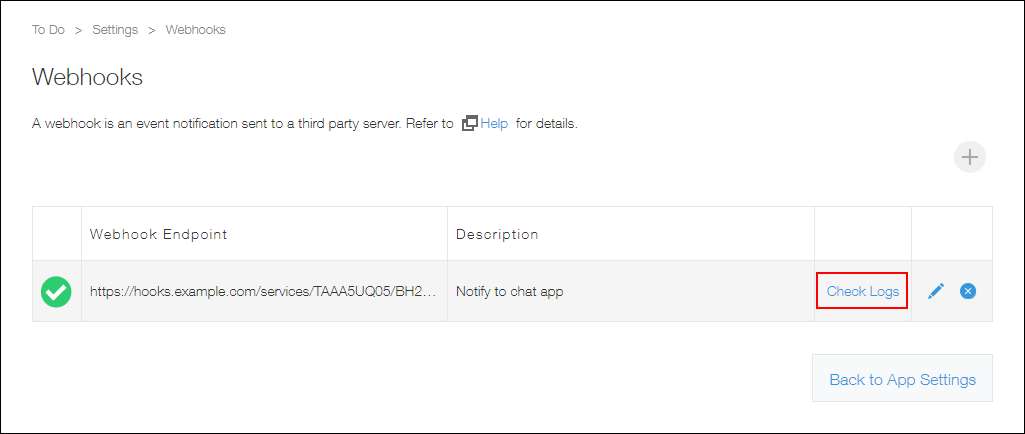
Click Check logs for the Webhook whose log you want to check.
-
Check the execution results from the log.
 : The notification was successfully sent.
 : The notification failed.
Causes of notification failures
If no notifications are being sent out, there is a possibility that your webhook settings are not configured correctly.
In this case, check your webhook settings.
If only some notifications are not being sent out, it may be due to one of the following reasons.
There were more than 60 notifications in one minute
A maximum of 60 webhook notifications can be sent per minute.
If more than 60 actions are carried out on records in one minute, webhook notifications will not be sent for the 61st and subsequent actions.
The notification failed due to an error attributable to Kintone
The following causes are possible.
- The data size of the notification exceeded the maximum limit (1 MB).
- A timeout occurred in Kintone.
The notification failed due to an error attributable to the web service meant to receive the notification
The following causes are possible.
- The web service meant to receive the notification was down for maintenance or other reasons.
- A timeout occurred in the web service meant to receive the notification.
- The number of notifications that can be received by the web service was exceeded.