
Reordering groups
This page describes the steps to change the display order of groups.
The changed display order is applied to the lists and dropdown lists in the administration screens.
-
Access Kintone users & system administration.
Accessing Kintone users & system administration -
Click Groups (or roles).
-
On the group whose display order you want to change, click the gear-shaped icon.
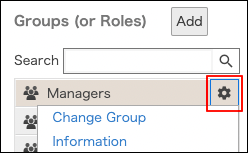
-
Click Reorder.
-
Change the display order of groups by drag-and-drop.
-
Click Save.