
Changing department information
This page describes the steps to change the department information, including the names and hierarchical structure of the departments.
Steps
-
Access Kintone users & system administration.
Accessing Kintone users & system administration -
Click Departments & users.
-
On the department whose information you want to change, click the gear-shaped icon.
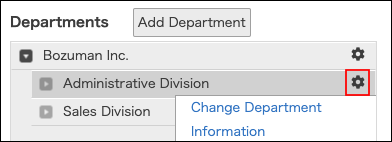
-
Click Change department information.
-
Change the department information.
Items of department information -
Click Save.