
System administration
This page describes the logs generated when you change the following settings in System administration in Kintone users & system administration.
- Login security
- Audit logs
- System mail account
- Misc settings
For an overview of items included in the audit logs, such as level, module, and result, refer to the following page:
Viewing audit logs
Notice
This section describes the audit logs whose level is Notice.
[System Administration]
Audit logs whose module is System administration are shown below.
[configure audit log setting]
Actions taken
Changed audit log settings.
Contents of "Complement"
Audit log retention periods.
[configure external service security settings]
Actions taken
Changed Misc settings.
Contents of "Complement"
The following items and their statuses are logged.
- Embedding into external sites
- Public URL Generation
- [Referrer-Policy]
- [Webhook]
The status is one of the following:
- If you enabled the setting: enable
- If you disabled the setting: disable
[configure security setting]
Actions taken
Changed Login security.
Contents of "Complement"
The changed settings.
For details, refer to the following section:
Properties for "configure security settings"
[download audit log archive]
Actions taken
Downloaded audit log.
Contents of "Complement"
Name of the downloaded file.
Information
This section describes the audit logs whose level is Information.
[System Administration]
Audit logs whose module is System administration are shown below.
[configure system mail account]
Actions taken
Changed system email address or settings of the email server.
Contents of "Complement"
The changed setting values.
[update logo]
Actions taken
Changed header logo image or URL of the hyperlink destination of the logo.
Contents of "Complement"
The specified URL is logged if the URL of the hyperlink destination of the logo is configured.
Properties for configure security settings
If you change the setting in Login security, the audit log details will look like as follows:
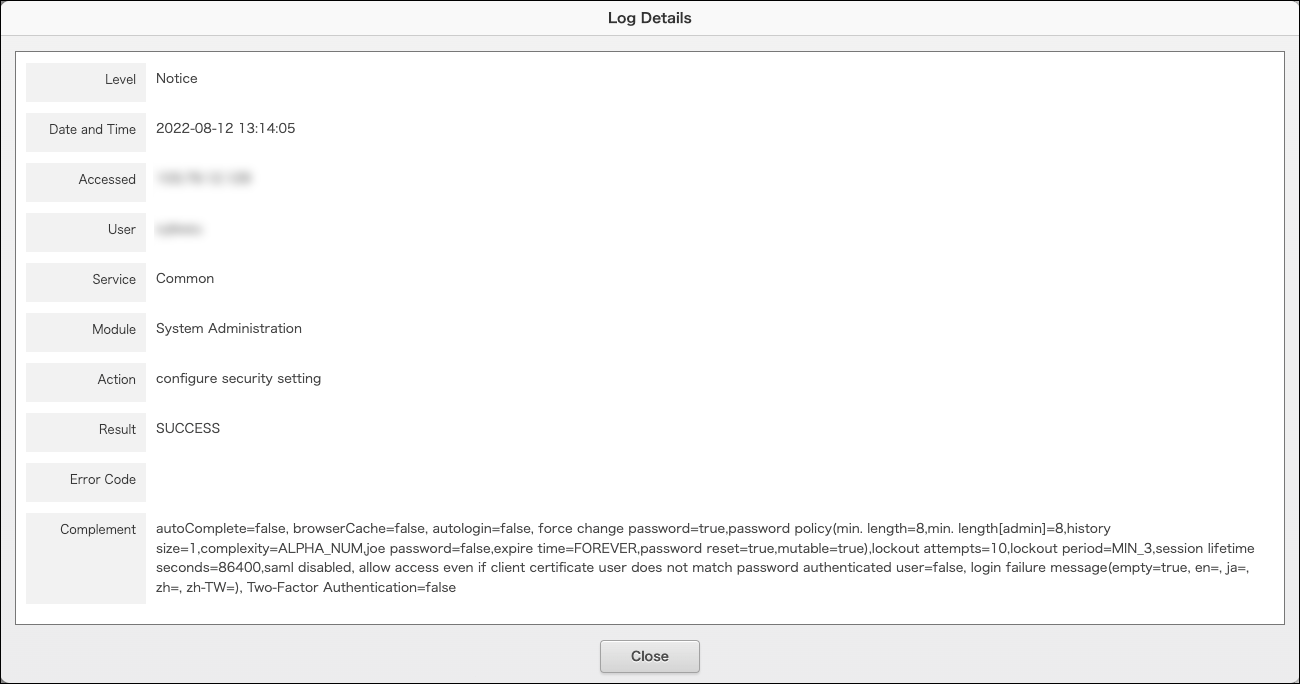
The Complement field will show the following properties.
[browserCache]
The value configured for Save login name & password.
- If enabled: true
- If disabled: false
[autologin]
The value configured for Automatic login.
- If enabled: The valid duration is logged. The value is expressed in seconds.
- If disabled: false
[force change password]
The value configured for Force users to change their passwords on their next login.
- If enabled: true
- If disabled: false
[password policy]
When users are allowed to change their passwords
It shows the password policy settings.
- min. length: Minimum number of characters for the user password
- min. length[admin]: Minimum number of characters for the administrator password
- history size: Password reuse limit
- complexity: Password complexity
- joe password: Allow users to use login name as password
- expire time: Password expiration period
- password reset: Allow users to reset their passwords
- mutable: Allow users to change their password
When users are not allowed to change their passwords
It shows password is immutable.
It does not show
password policy.
[lockout attempts]
The value configured for Number of failed attempts before account lockout.
It shows
0 if Never lockout is selected.
[lockout period]
The value configured for Account lockout duration (how long locked out accounts remain locked out).
It shows
FOREVER if Never unlock is selected.
[session lifetime seconds]
The lifetime of a login session. The value is expressed in seconds.
[saml]
When SAML authentication is enabled
It shows enabled as a value configured. The following setting items are also shown along with it.
- require saml authentication:
Require SAML authentication - saml login url:
SSO endpoint URL for Identity Provider (IdP) - saml logout url:
URL redirected to, after logout from Kintone - set new saml certificate:
It shows true if a public key certificate used for signature by IdP is registered.
When SAML authentication is disabled
It shows disabled as a value configured.
[login failure message]
The message configured for Additional message on login failure.
If the error message is not configured, the message part (example: ja=message) appears empty.
- ja: Japanese
- en: English
- zh: Chinese (Simplified)
- zh-TW: Chinese (Traditional)
- es: Spanish
- pt-BR: Portuguese (Brazil)
- th: Thai
- [ms]: Malay
[Two-Factor Authentication]
The value configured for Allow users to use two-factor authentication.
- If enabled: true
- If disabled: false
[enforce Two-Factor Authentication]
The value configured for Require two-factor authentication.
- If enabled: true
- If disabled: false